


Quick Summary
- WhatsApp introduces usernames for enhanced privacy in 2026.
- Users can connect without sharing their phone numbers.
- This feature aims to improve user security and control.
- The rollout is expected to impact user interactions significantly.
- Learn how to set up and use the new feature.
WhatsApp is launching a new WhatsApp username feature in 2026, allowing users to connect without sharing their phone numbers. This significant change aims to enhance privacy and security, making it easier for users to interact with new contacts.
This update is particularly relevant given growing concerns about online privacy and the need for secure communication methods. With the username feature, users can engage in conversations while maintaining greater control over their personal information.
Understanding the WhatsApp Username Feature
The WhatsApp username feature allows users to create a unique identifier that others can use to connect with them. Instead of sharing phone numbers, users can simply share their usernames, providing a layer of anonymity.
This feature is particularly beneficial for those who want to keep their personal information private while still being able to communicate freely. Users can set their usernames to anything they choose, making it easy to find and connect with others.
For more details on WhatsApp updates, check out our article on recent changes.
Why This Change Matters
Privacy concerns have escalated in recent years, making features like usernames increasingly relevant. By allowing users to connect without sharing their phone numbers, WhatsApp aims to protect user identities and reduce the risk of unwanted contacts.
This shift represents a broader trend in the tech industry towards prioritizing user privacy. As messaging apps evolve, features like usernames could set new standards for secure communication.
How to Set Up Your Username
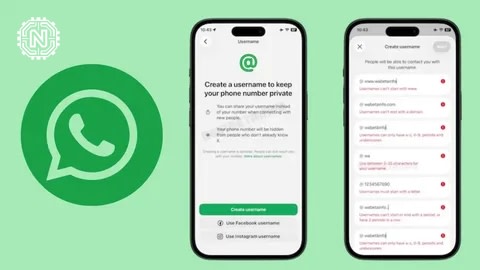
Setting up your WhatsApp username is straightforward. Users can navigate to their profile settings, where they will find an option to create a username. After selecting a unique name, it will become visible to others who wish to connect.
It's important to choose a username that reflects your identity while maintaining some level of privacy. Avoid using personal information in your username to enhance your security.
What Users Are Saying
Initial reactions to the WhatsApp username feature are positive. Users appreciate the enhanced privacy and the ability to connect without revealing their phone numbers.
Many view this as a proactive step towards more secure messaging. However, some users express concerns about the potential for impersonation or misuse of usernames.
For insights on user experiences, visit Tech News.
Comparing WhatsApp to Other Messaging Apps
With the introduction of the username feature, WhatsApp joins other messaging platforms that prioritize user privacy. Apps like Signal and Telegram already offer similar functionalities.
| App | Username Feature | Phone Number Required |
|---|---|---|
| Yes | No | |
| Signal | Yes | No |
| Telegram | Yes | No |
| Facebook Messenger | No | Yes |
| iMessage | No | Yes |
This comparison highlights WhatsApp's commitment to adapting its features to meet user needs in a competitive landscape.
Future Outlook for WhatsApp Features
As WhatsApp continues to innovate, the username feature may pave the way for additional privacy enhancements. Users can expect further updates focused on security and user control.
The company is likely to monitor user feedback closely to refine this feature and potentially introduce new functionalities that align with user expectations.
Conclusion
The WhatsApp username feature is a significant step towards enhancing user privacy in 2026. By allowing connections without phone numbers, WhatsApp is addressing growing concerns about online security while providing users with more control over their interactions.
Frequently Asked Questions
What is the WhatsApp username feature?
The WhatsApp username feature allows users to create a unique username, making it easier to connect without sharing phone numbers.
How do I set up my WhatsApp username?
To set up your WhatsApp username, go to Settings, tap on your profile, and enter your desired username in the designated field.
Can I change my WhatsApp username later?
Yes, you can change your WhatsApp username at any time through your profile settings.
Is the WhatsApp username feature available for all users?
As of 2026, the WhatsApp username feature is available globally for all users on the latest app version.
Does the WhatsApp username feature affect my privacy?
Using a username instead of a phone number can enhance privacy, as it allows others to contact you without revealing your number.
Will my contacts see my WhatsApp username?
Yes, your contacts can see your WhatsApp username, but they will still need your permission to message you.
What happens if someone takes my WhatsApp username?
If someone else claims your desired WhatsApp username, you'll need to choose a different one, as usernames are unique.
Are there any limitations on WhatsApp usernames?
WhatsApp usernames must adhere to specific guidelines, including length restrictions and disallowing special characters. For more on Apps & Software, explore Newtechzy. You can also review our Privacy Policy and Cookie Policy, or learn more About us.
Related Topics
Want to stay updated on WhatsApp features? Subscribe to our newsletter for the latest news and tips on messaging apps.
Start Your Journey Today!


